How to Read Airport Departure Boards & Flight Status
Published: 17 November 2026 · Updated: 17 November 2026
A departure board looks busy, but it follows the same grid at every airport in the world. Once you know the columns and the handful of status words, any board — the big screen in the hall, your airline's app, or the airport's own website — reads the same way. This guide decodes it all, in plain language, and points you to the free tools that answer the next question: how far, how long, and which airport code is which.
Find your flight number first — it is unique, unlike the city name. Then confirm the terminal before security and the gate after it, and watch the status together with the estimated time. If the estimated time keeps moving later, the delay is real. Re-check the gate shortly before boarding: it is the column that changes most.
Researched by MixKhazana Team · Last updated 17 November 2026 · This page shows no live flight data; for live status, use your airline's app or the airport's own departures page.
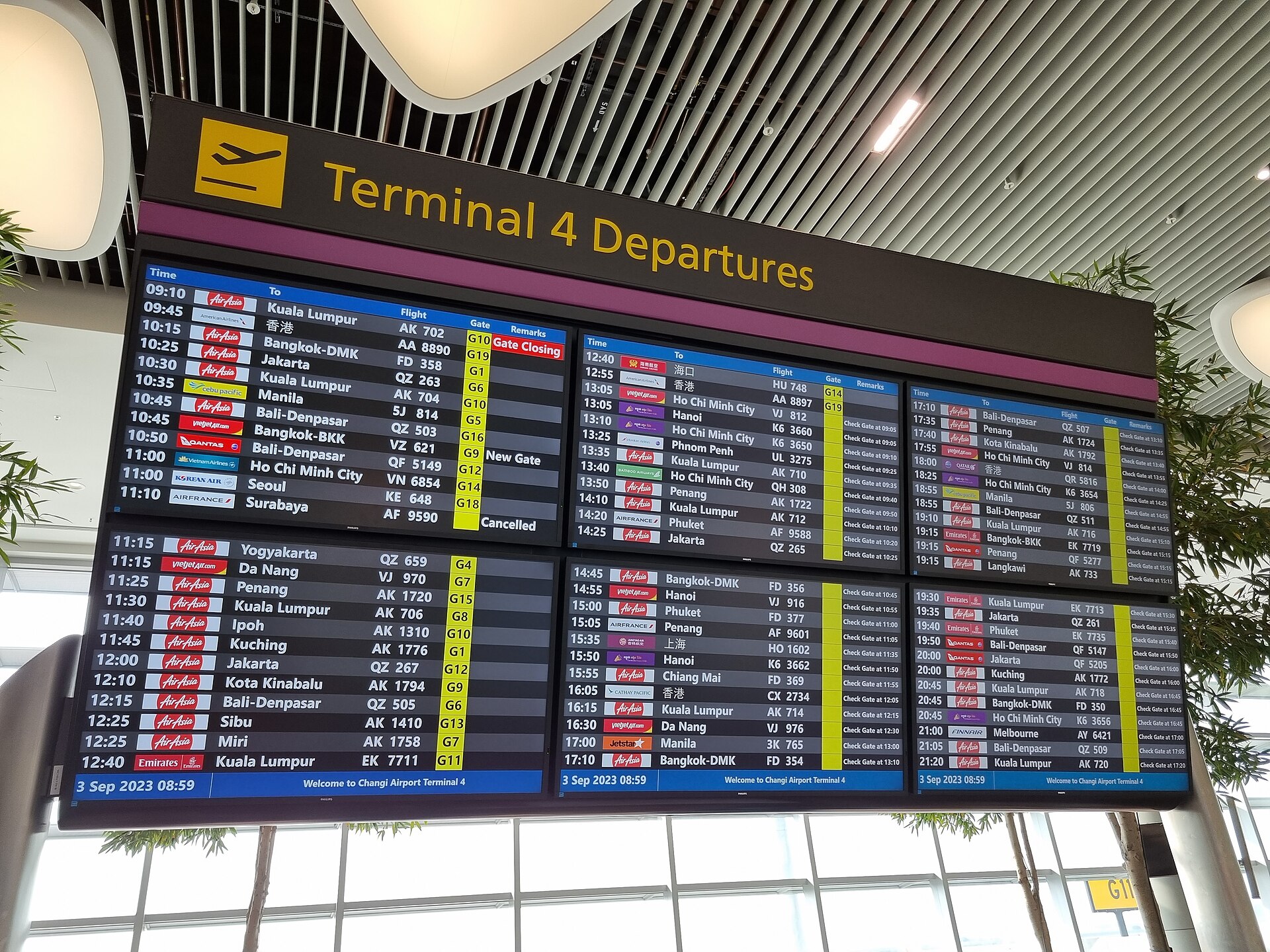
The columns, left to right
Most boards — physical screens and websites alike — show the same columns in the same order. Read them in this sequence and you will never get lost:
| Column | What it tells you |
| Time | The scheduled departure time first, often with an estimated time beside it when a delay is forming. |
| Destination | The city you are flying to, often with its three-letter airport code (for example, Paris CDG). |
| Flight number | The airline code plus digits, such as BA249 or EK225. This is the single most precise way to identify your flight. |
| Airline | The carrier. Watch for codeshares: one flight sold under several airline names (see below). |
| Terminal | Which terminal to go to. At large airports the terminals can be far apart, so confirm this before you clear security. |
| Gate | Where to board. Gates are assigned or changed close to departure — never trust a gate you saw an hour ago. |
| Status | The live label: on time, delayed, boarding, departed, cancelled and the rest — decoded in full below. |
Arrivals boards mirror this layout: the city column shows where the flight came from, and the times are landing times. Everything else works the same way.
Scheduled vs estimated vs actual time
The time column causes the most confusion, because a board can show up to three different times for the same flight:
- Scheduled — the published timetable, set when the airline filed the flight, sometimes months ahead. It never changes.
- Estimated — the airline's current best guess, revised as conditions change. When scheduled and estimated differ, a delay is forming. When the estimate creeps later in 15-minute steps, the delay is real and growing.
- Actual — what really happened: the real pushback, take-off, landing, or arrival at the gate. This appears only after the event.
One more subtlety: "departed" usually means the aircraft pushed back from the gate, not that it is airborne, and "arrived" usually means it reached the gate, not that it touched down. The minutes between those moments are taxi time, and at big airports taxi time alone can be 20 minutes or more.
Every status word, decoded
Boards use a small vocabulary, and each word carries a precise meaning. Here they are in the order a flight moves through them:
| Status | What it means | What to do |
| Scheduled | The flight is planned but not yet active. Times shown are the published ones. | Nothing yet — check back closer to departure. |
| On time | No delay has been filed. It does not guarantee the flight will leave on time. | Proceed to the airport normally. |
| Estimated | The departure time has been revised, often by a small amount. | Note the new time and adjust your plans. |
| Delayed | The airline has officially pushed the departure later. | Check the delay length; watch for further moves. |
| Boarding | Passengers are walking onto the aircraft now. | Get to the gate immediately if you are not there. |
| Last call | Boarding is almost finished; stragglers are being paged. | Run — this is the final warning. |
| Gate closed | The aircraft door is sealed. Nobody else boards. | Go to the airline service desk at once. |
| Departed | The aircraft has left the gate. | The flight is underway or taxiing. |
| En route | The aircraft is airborne. | For pickups: work out the landing time, not the departure. |
| Landed | The aircraft has touched down. | Allow taxi + gate time before meeting anyone. |
| Arrived | The aircraft is at the gate and doors are open. | Head to arrivals or baggage claim. |
| Cancelled | The flight will not operate. | Contact the airline for rebooking or a refund. |
| Diverted | The aircraft landed at a different airport. | Wait for the airline's instructions. |
Why the board and the app disagree
Three sources can show three different answers for the same flight, and all three can be "right" at different moments. The airline's own app is usually first, because the airline files the change. The airport's own departures page comes next, and gate assignments sometimes appear there before anywhere else. The big screens in the terminal can lag both by several minutes. If they disagree, trust the airline's app first, then the airport's page, and treat the hall screen as the slowest of the three. A useful habit: check the inbound aircraft. Your plane flies in from somewhere else first, and if that inbound flight is late, yours will be late too — whatever your status line still says.
Codeshares, terminals, and gate changes
A codeshare is one physical flight sold under several flight numbers by partner airlines, so the board may list the same departure two or three times with different airline codes. Find the flight number on your booking, then follow the operating airline — the carrier actually flying the plane — for the authoritative status. Terminals matter before security: at multi-terminal airports the terminals can be landside-separated, so confirm yours before you join the security queue. Gates matter after security and change often, because gates are re-assigned as aircraft arrive and depart. Check the gate again after security, and once more shortly before boarding.
Where to check live flight status
This page deliberately shows no live data — live boards need live feeds, and a stale copy would mislead you. For the live picture, use these, in order:
- Your airline's app or website — first with delays, gate changes, and rebooking options. Turn on its flight notifications before travel day.
- The departure airport's own departures page — every major airport runs one (for example, Heathrow's official departures page). Gate assignments sometimes appear here first.
- The terminal screens — useful once you are inside, but the slowest of the three. Re-check them after security.
For planning before travel day — how far your flight goes, roughly how long it takes, and which airport code is which — our free tools below do the arithmetic with no sign-up and no live feed needed.
Worked example: reading one row
Imagine this row on a departures board: 14:35 · Dubai (DXB) · EK008 · Terminal 3 · Gate B12 · Delayed to 15:20.
- 14:35 is the scheduled time; 15:20 is the new estimated time — a 45-minute delay has been filed.
- EK008 is the flight number: EK is the airline code, 008 the flight. Search by this number in the airline app for the fullest detail.
- DXB is the destination airport code. If you are unsure what a code means, the airport code finder decodes it.
- Terminal 3 / Gate B12: confirm the terminal before security; re-check gate B12 after security, because it can still change.
- Delayed to 15:20: the delay is official. Keep watching — if the estimate moves again, the delay is growing.
Before the trip, the flight time calculator gives an honest estimate of how long the journey itself takes, and the flight distance calculator shows how far you are actually flying.
Frequently asked questions
What does "estimated" mean on a departure board?
Estimated means the airline has revised the departure time from the published schedule. It is the airline's current best guess, updated as conditions change. If the estimated time keeps moving later in small steps, the delay is real and growing.
What is the difference between scheduled and estimated departure time?
Scheduled time is the published timetable set when the airline filed the flight, sometimes months ahead. Estimated time is the airline's live revision of that time. Actual time is what really happened. When scheduled and estimated differ, a delay is forming.
What does "gate closed" mean?
Gate closed means boarding has finished and the aircraft door is sealed. No more passengers can board, even if the plane is still sitting at the gate. If you see it and you are not on board, go to the airline's service desk at once.
Why does my flight say "on time" when the plane has not arrived yet?
On time only means no delay has been filed yet. The board does not know the future: the incoming aircraft may still be late, and the status will change once the airline files the delay. Check again closer to departure, and check the inbound flight if you can.
Where is the most reliable place to check flight status?
Your airline's own app or website is usually first with changes, because the airline files them. The departure airport's own departures page is the second best source, and gate assignments sometimes appear there first. Airport display screens in the terminal can lag both by several minutes.
What is a codeshare flight number?
A codeshare is one physical flight sold under several flight numbers by partner airlines. The board may list the same departure two or three times with different airline codes. Find your booking's flight number, then check the operating airline — the carrier actually flying the plane — for the authoritative status.
Why do gate numbers change so often?
Gates are assigned and re-assigned as aircraft arrive, depart, and run late, so a gate shown an hour ago may no longer be right. Always re-check the gate after security, and again shortly before boarding. The flight number stays the same; the gate is the moving part.
What should I do if my flight is cancelled?
Contact the airline that sold you the ticket for rebooking or a refund — airport staff generally cannot rebook you. Do it through the airline's app or phone line as well as in person, since the queue at the desk is longest exactly when cancellations happen. Keep your booking reference ready.
Sources
- Heathrow Airport — Departures — an example of an airport's own official departures page; every major airport runs an equivalent page.
- Airline apps and airport flight-information pages (checked 17 November 2026) — the status vocabulary on this page follows the common wording used across airline and airport boards.
- Flight distance and time figures on this site come from the free flight tools — great-circle computation over verified open airport data; flight times are labeled estimates.
Disclaimer: This guide explains how departure boards work; it shows no live flight data. For live status, rebooking, and compensation questions, your airline is the authoritative source. Status words can vary slightly between airlines and airports.
Free flight tools
- Free Flight Distance Calculator — how far your flight goes, airport to airport.
- Free Flight Time Calculator — an honest estimate of journey time, with the model shown.
- Free Airport Code Finder — look up any IATA or ICAO code.
- Free Trip Itinerary Planner — plan the whole trip day by day, saved in your browser.
Disclosure: MixKhazana may earn a commission if you book through the link below, at no extra cost to you. Compare flights on Aviasales →